
Ever dreamed of having a personal AI artist on demand? Imagine messaging a Telegram bot with "Create a professional headshot in a library setting," and seconds later, a stunning image appears. Or sharing a photo of an outfit you spotted online and instantly seeing yourself wearing something similar. That's exactly what InstaGenie does.
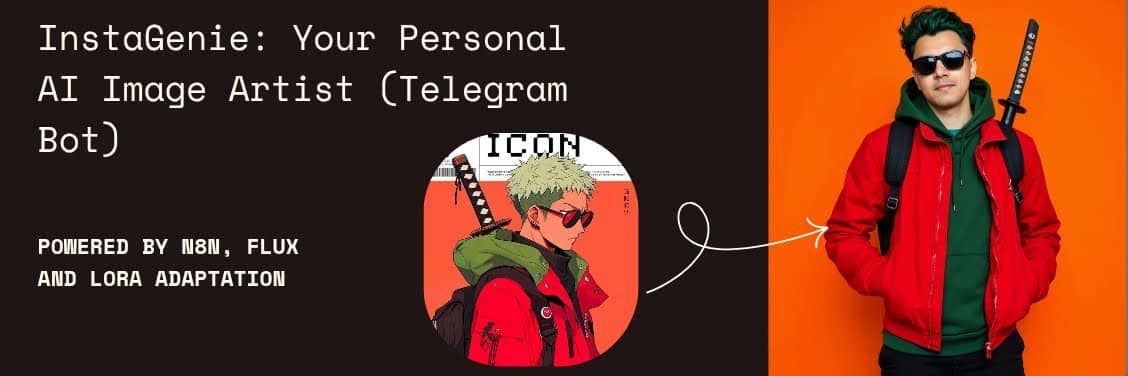
InstaGenie is a Telegram bot I built that turns text descriptions, voice notes, and image inspirations into custom AI-generated images. The best part? The entire backend is a visual workflow in n8n -- no traditional coding required.
What InstaGenie Can Do
This isn't just a wrapper around an image generation API. It's a fully-featured creative assistant with multiple input modes and intelligent routing:
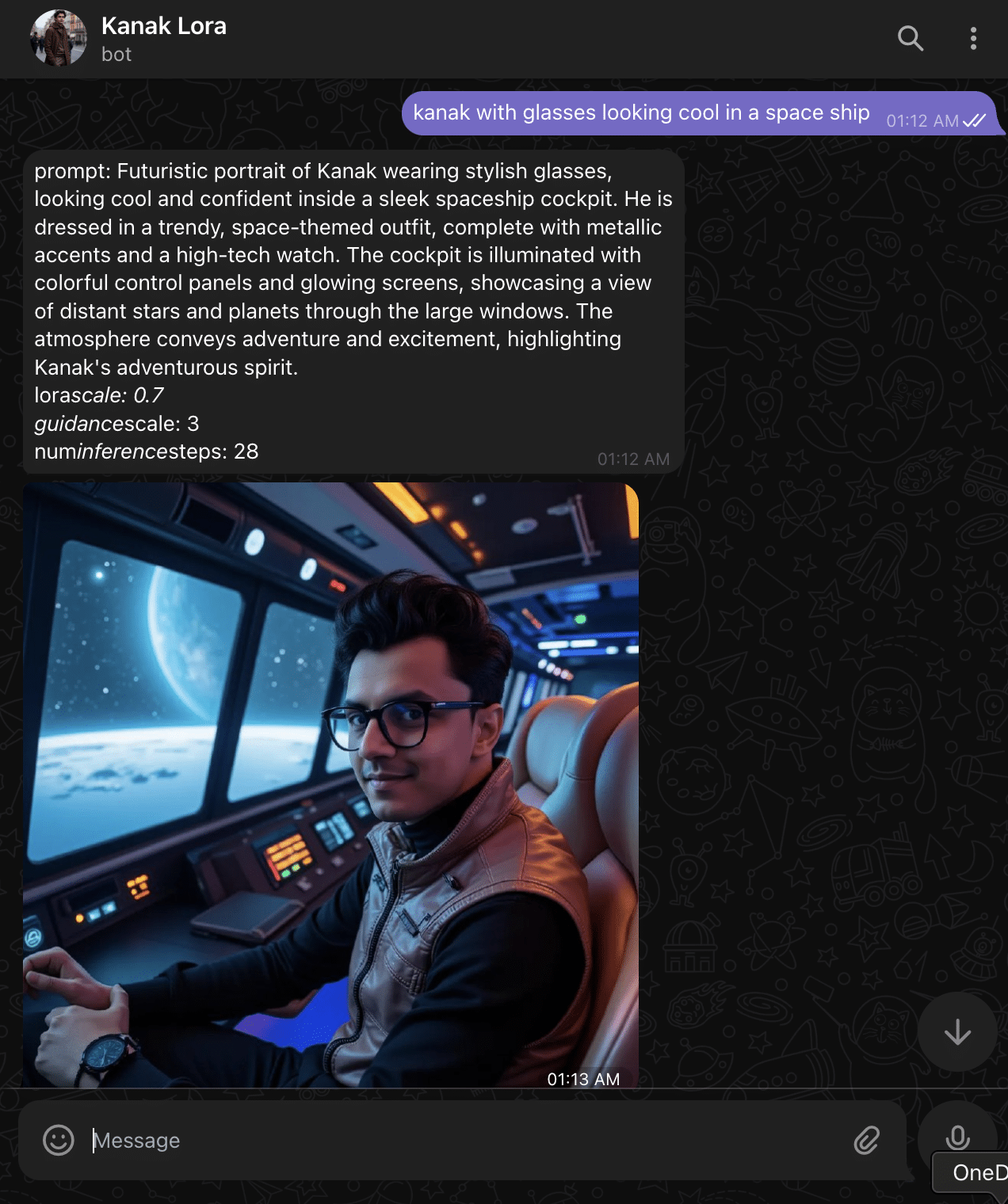
Text-to-Image Generation: Describe any scene, character, or concept in plain text, and InstaGenie creates it. The bot enhances your prompt, feeds it to the Flux model with a custom LoRA, and returns a high-quality image. Here's an example -- a simple prompt like "kanak with glasses looking cool in a space ship" gets expanded into a richly detailed scene description, and the result is a photorealistic portrait generated entirely by AI:
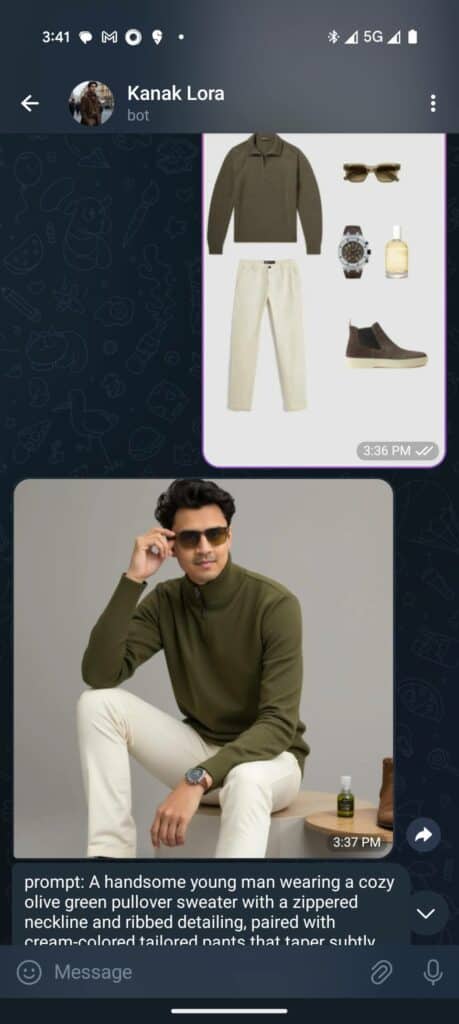
Image-to-Image Transformation: Share a photo of an outfit you like, and InstaGenie generates an image of a model wearing something similar. OpenAI's vision model analyzes the reference image, describes the outfit in detail, and that description becomes the generation prompt. It's like a virtual try-on without leaving Telegram:
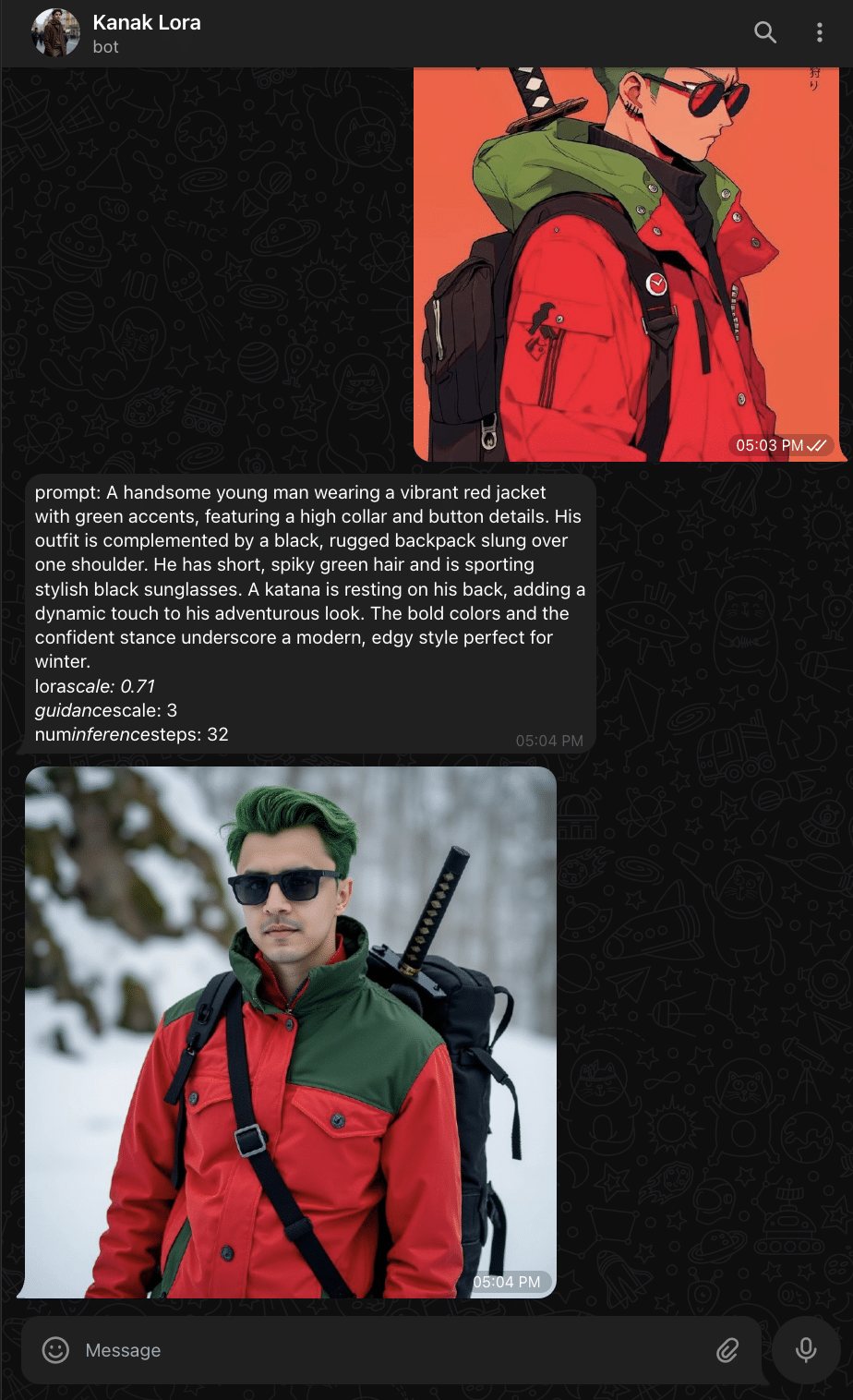
LoRA-Powered Personalization: The real magic is the custom LoRA trained on personal reference images. This means InstaGenie doesn't just generate generic images -- it can create images of you in any setting or style. Send an anime character reference, and get a photorealistic version with your likeness:
Live Configuration: Adjust parameters like resolution, diffusion steps, guidance scale, and LoRA strength directly through natural language chat commands. The bot understands conversational requests like "show bot config" or "set steps to 20" and persists your preferences across sessions:
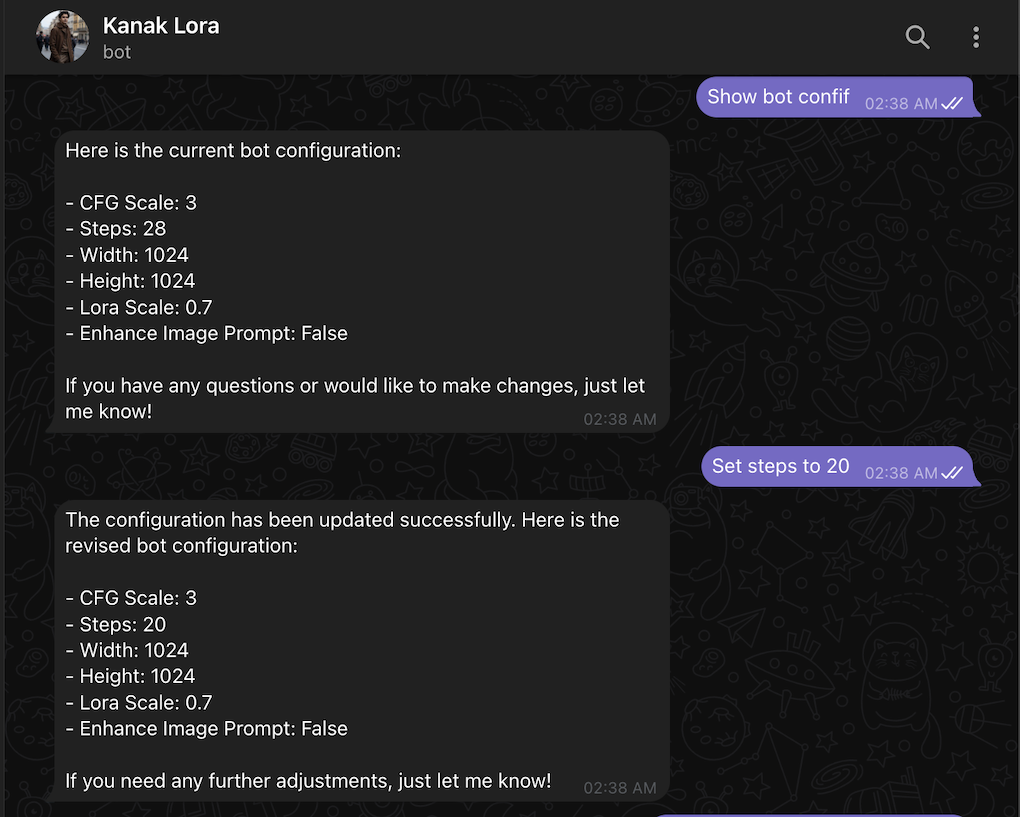
Voice Input: Record a voice note describing what you want. InstaGenie transcribes it with OpenAI's Whisper and generates the image -- perfect for when typing feels like too much work.
The Architecture
The system is built on four core services, orchestrated entirely through n8n's visual workflow builder:
- n8n -- The automation backbone. Every piece of logic, from message routing to API calls, is a visual node in a workflow.
- Telegram API -- The user-facing interface. All interactions happen through a Telegram bot created via BotFather.
- Replicate API -- Hosts the Flux image generation model with LoRA support. This is where the actual image creation happens.
- Supabase -- Stores per-user configuration (resolution, steps, LoRA scale, etc.) so preferences persist across sessions.
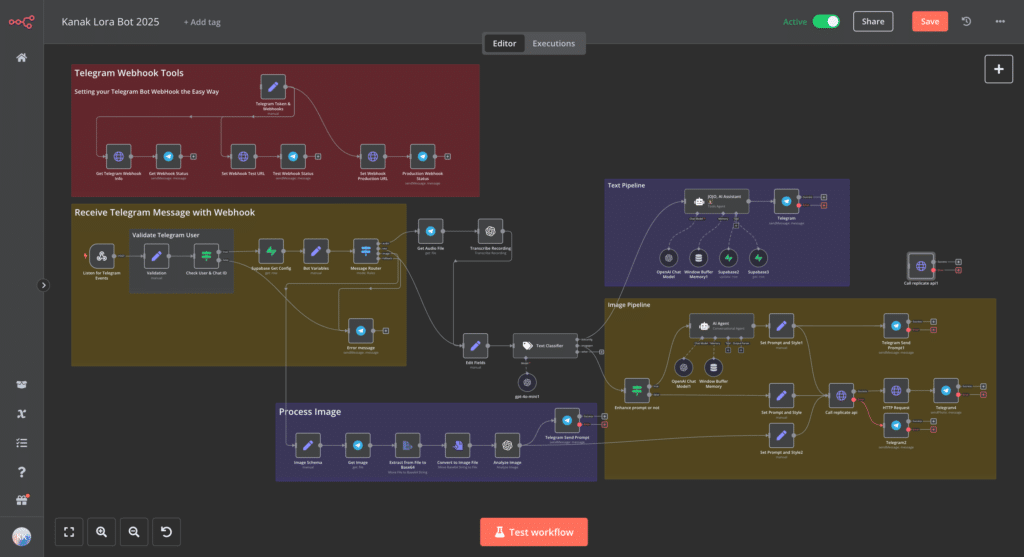
The workflow is organized into clearly labeled sections: Telegram Webhook Tools for initial setup, message reception and validation, audio/text/image processing branches, a text pipeline with AI assistant for configuration, and the image generation pipeline that calls the Replicate API.
How the Workflow Works
The n8n workflow follows a clean pipeline architecture with branching logic based on input type.
Message Intake and Validation
Every incoming Telegram message hits a webhook node. A validation step checks the sender's Chat ID against an allowlist -- this keeps the bot private during development. If validation fails, the user gets a generic error response.
Configuration Retrieval
Before processing any request, the workflow pulls the user's saved configuration from Supabase. This includes parameters like enhance_img_prompt, cfg_scale, steps, width, height, and lora_scale. These get loaded into a "Bot Variables" node that downstream nodes can reference.
Intelligent Message Routing
A Switch node examines the incoming message and routes it down one of three paths:
-
Audio branch -- Downloads the voice file, sends it to OpenAI for transcription, then feeds the resulting text into the image generation pipeline.
-
Text branch -- Extracts the message text and passes it through a LangChain Text Classifier. The classifier categorizes it as either
botconfig(user wants to change settings),imagegen(user wants an image), orother(general conversation). -
Image branch -- Downloads the attached photo, runs it through OpenAI's vision model to generate a detailed description, then feeds that description into the image pipeline.
The AI Assistant
For bot configuration and general queries, an AI Agent node powered by OpenAI acts as a conversational assistant. It has access to two Supabase tool nodes -- one to read the current config and one to update it. Conversation history is maintained through a Window Buffer Memory node keyed to each user's Telegram ID.
So when a user says "change my image width to 512 and increase steps to 30," the agent understands the intent, updates Supabase, and confirms the changes in natural language.
The Image Generation Pipeline
This is where the magic happens:
-
Prompt Enhancement -- If the user has
enhance_img_promptenabled, a dedicated AI Agent rewrites their prompt to be more descriptive and effective for image generation. A simple "sunset photo" might become a richly detailed scene description. -
Replicate API Call -- The refined prompt is sent to Replicate's Flux model via HTTP request. The request body includes all user-configured parameters:
{
  "version": "091495765fa5ef2725a175a57b276ec30dc9d39c22d30410f2ede68a3eab66b3",
  "input": {
    "prompt": "the enhanced prompt text",
    "hf_lora": "kanakjr/nov_lora",
    "lora_scale": 0.8,
    "num_outputs": 1,
    "aspect_ratio": "1:1",
    "output_format": "webp",
    "guidance_scale": 7.5,
    "output_quality": 80,
    "prompt_strength": 0.8,
    "num_inference_steps": 28
  }
}
- Image Delivery -- The generated image URL is downloaded and sent back to the user in Telegram.
Understanding Flux and LoRA
Flux is a flexible, open-source image generation model hosted on Replicate. It serves as the base model -- capable of generating high-quality images from text prompts out of the box.
LoRA (Low-Rank Adaptation) is what makes this truly personal. Instead of fine-tuning the entire Flux model (which would be expensive and slow), LoRA adds small, trainable adapter layers that teach the model new concepts -- like your face, a specific art style, or a product aesthetic -- without modifying the core weights.
You can train a custom LoRA with as few as 10-20 reference images. I trained mine on selfies, which means InstaGenie can generate images of "me" in any setting or style. The lora_scale parameter (0.0 to 1.0) controls how strongly the LoRA influences the output.
Pre-trained LoRAs for various styles are available on platforms like CivitAI, or you can train your own using guides like this one from Pelayo Arbues.
Prerequisites for Building Your Own
If you want to replicate this setup, you'll need:
- A Telegram account and a bot created through BotFather
- A self-hosted or cloud n8n instance
- A Replicate account with API credits
- A Supabase project with a configuration table
- An OpenAI API key for transcription, vision analysis, and prompt enhancement
- Optionally, a custom LoRA trained on your own images
The entire workflow runs as a single n8n automation. No server code to maintain, no deployment pipelines to manage. When you want to change how the bot behaves, you drag and connect nodes in a visual canvas.
What's Next
The current setup works well for personal use, but there are a few directions I'm exploring:
- Style presets -- Pre-configured prompt templates for common use cases like "professional headshot," "anime portrait," or "product photography."
- Batch generation -- Generate multiple variations from a single prompt and let the user pick their favorite.
- Scheduling -- Generate a daily AI-created image based on a theme and post it automatically to social media.
- Multi-model support -- Swap between different base models (Flux, SDXL, etc.) based on the use case.
The combination of n8n's visual workflows, Replicate's model hosting, and Telegram's ubiquity makes this kind of personal AI tooling surprisingly accessible. You don't need to be a machine learning engineer to have your own AI artist -- you just need to connect the right pieces.