
We've all been sold the dream of the "smart home." A home that knows you, anticipates your needs, and makes life simpler. But let's be honest, for many of us, it's just a collection of glorified remote controls on our phones. My lights turn on with a tap, and my thermostat follows a schedule. It's automated, yes, but is it truly smart?
I wanted to go beyond simple "if this, then that" logic. I envisioned a home that could understand context, summarize its day for me, and provide genuinely intelligent security alerts. Today, I'm thrilled to share how I made that vision a reality by combining three powerful tools: Home Assistant as the body, n8n as the nervous system, and a Large Language Model (LLM) like Google's Gemini as the brain.
This isn't just about automation; this is about creating a home with ambient intelligence. Let me show you how.
The Command Center: A Quick Tour
First, let's look at the command center where all this information comes together: my Home Assistant dashboard.
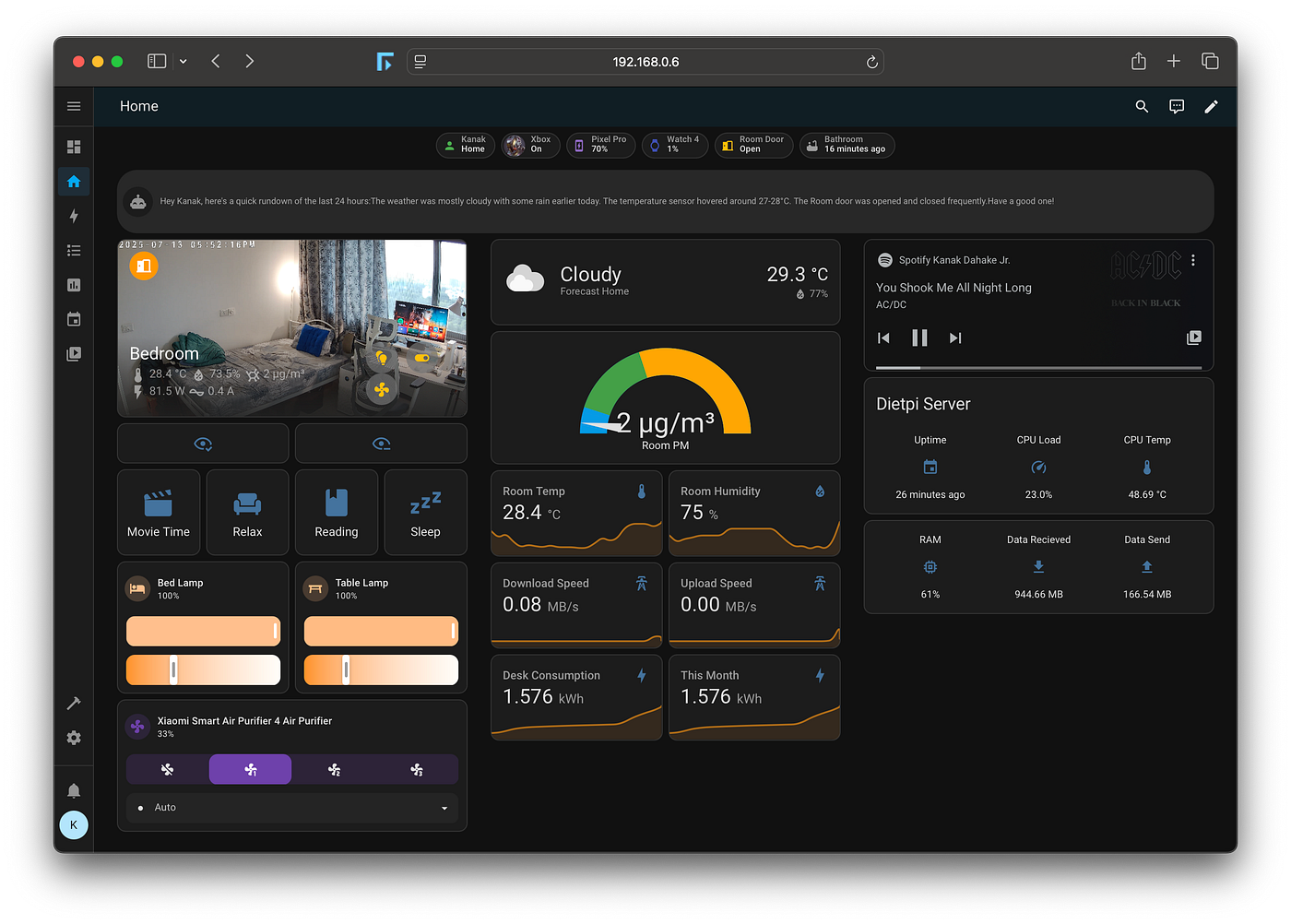
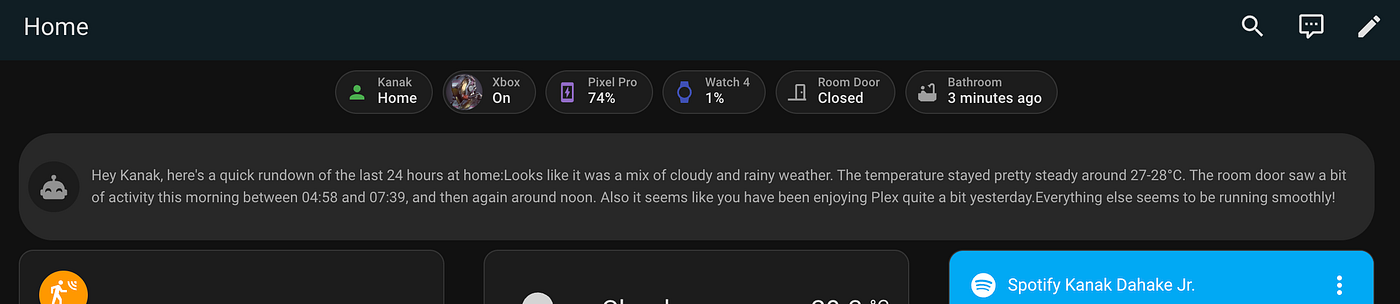
As you can see, I'm pulling in data from all corners of my home: real-time stats on my DietPi server, room temperature and humidity, my energy consumption, and controls for my lights and air purifier. But notice that card at the top? That's "Homey," my home's AI persona, giving me a quick, human-readable rundown of the last 24 hours. That's our first stop.
The "End-of-Day" Digest: My Home's Daily Journal
Instead of scanning through a dozen different sensors and history graphs, I now get a personalized report delivered to me every night.
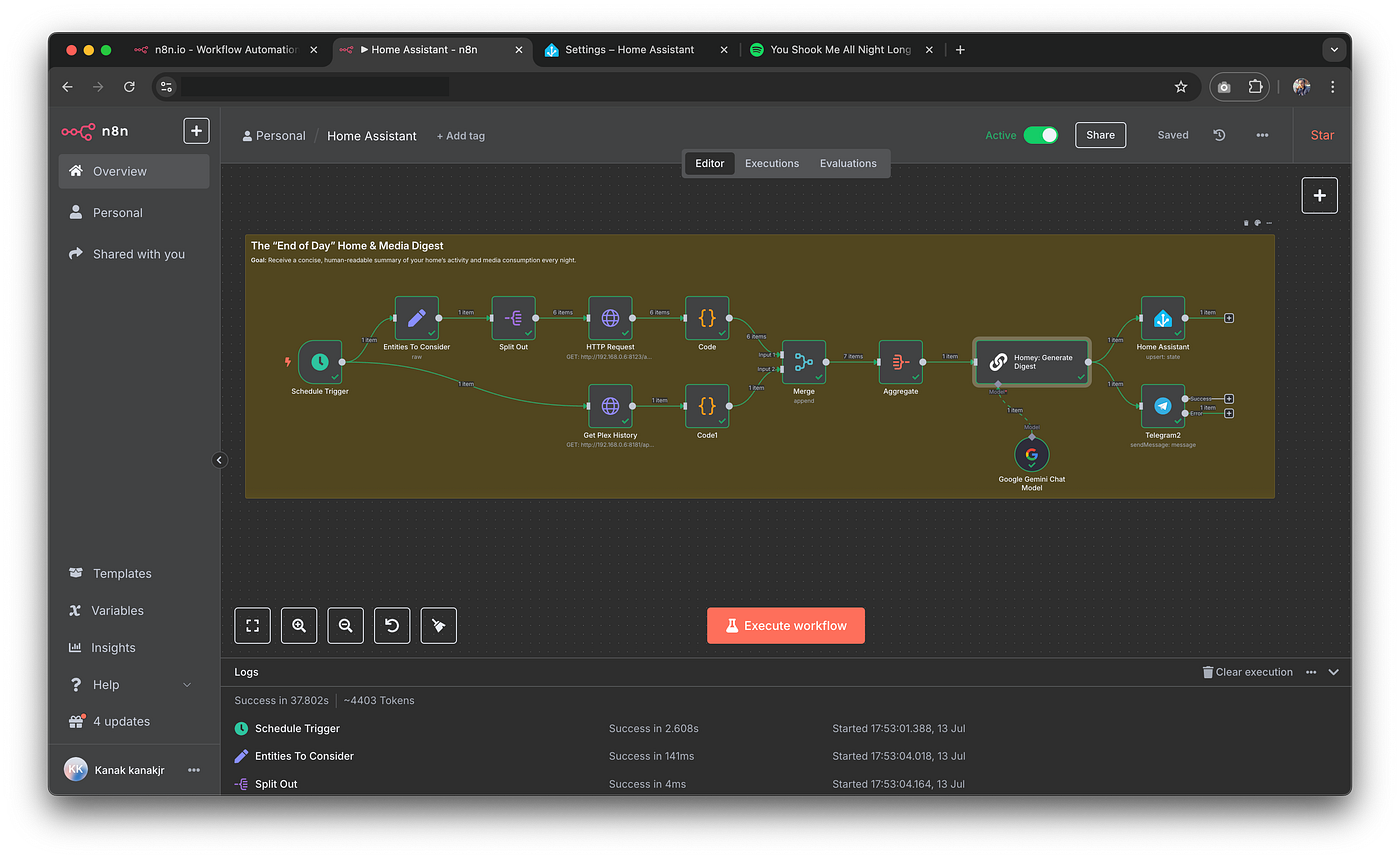
The Goal: To receive a concise, conversational summary of my home's activity and media consumption.
The Workflow: This entire process is orchestrated by n8n, a workflow automation tool that connects all my services.
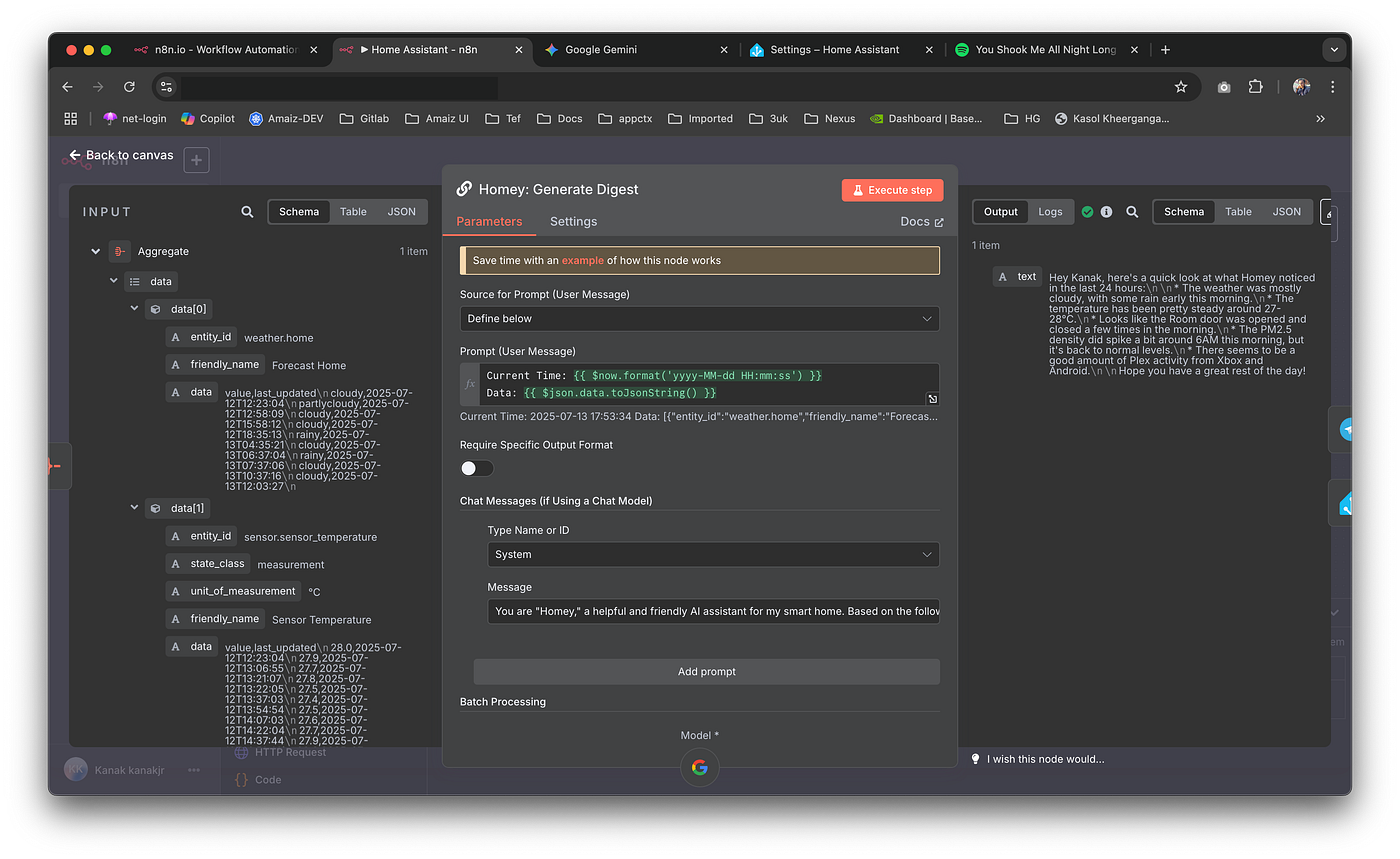
Here's the breakdown of this n8n workflow:
- Scheduled Trigger: At 10:22 PM every night, the workflow kicks off automatically.
- Gathering Intel: n8n makes a series of calls to my Home Assistant and Plex APIs to fetch the last 24 hours of data. This includes everything from
weather.homeandsensor.sensor_temperatureto myGalaxy_Watch4_..._daily_stepsand Plex viewing history. - The AI's Magic Touch: This is where the magic happens. n8n bundles all this raw data into a carefully crafted prompt for the Google Gemini LLM. The prompt essentially says: "You are 'Homey,' a friendly AI assistant. Based on the following data, write a brief, conversational report for 'Kanak'. Highlight notable occurrences and be concise and friendly."
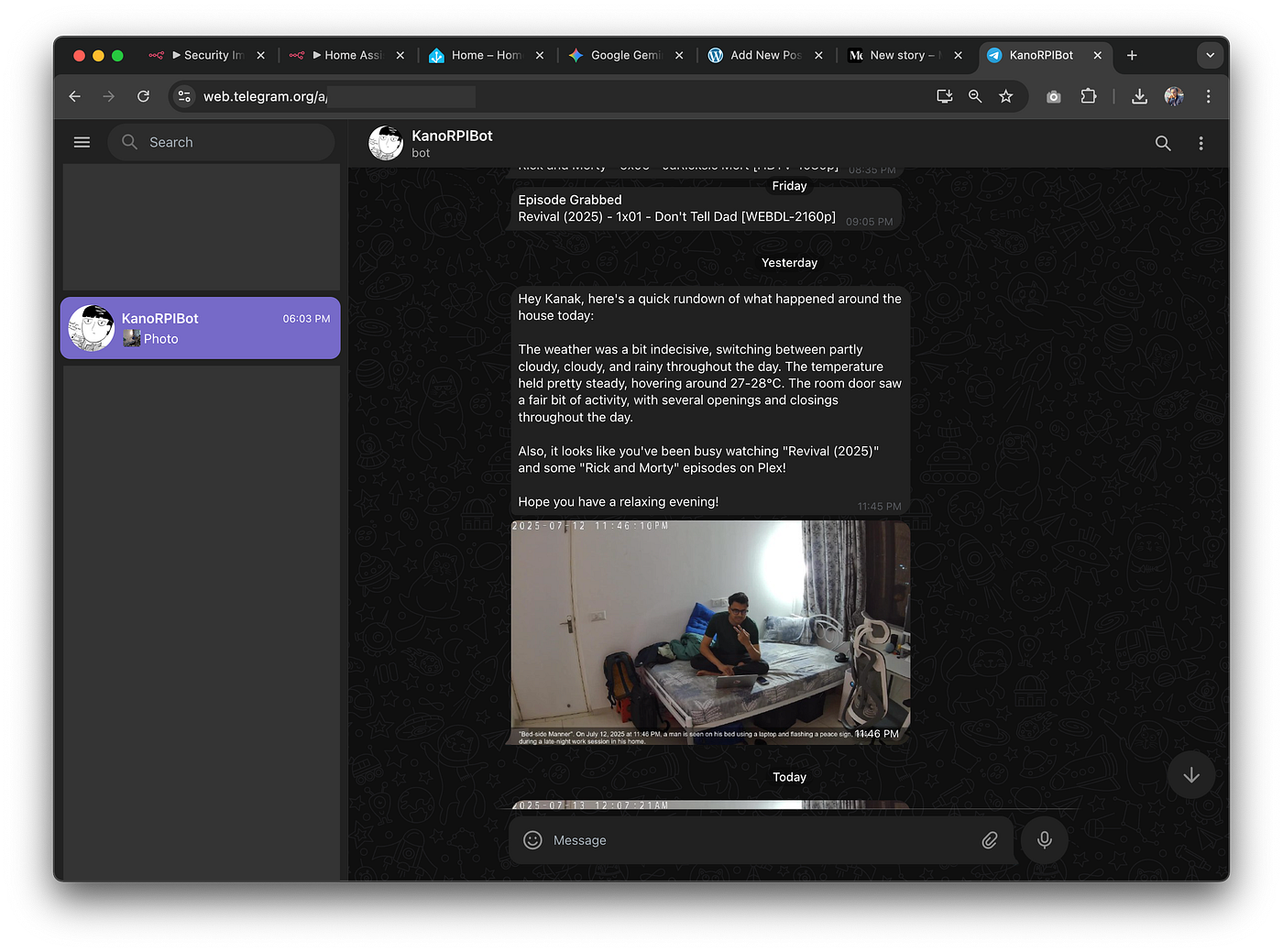
The Result: The LLM processes the data and sends back a natural language summary. This summary is then sent as a Telegram message and also updates the "Homey" sensor on my Home Assistant dashboard. The result is a delightful and informative summary that tells me everything I need to know at a glance, turning raw data into useful insight.
Smart Security: AI as My Personal Watchdog
Generic motion alerts are noisy. An alert telling me "Person detected in the bedroom while you're not home, and here's what they're doing" is true security.
The Goal: To get meaningful, context-rich security alerts with AI-generated image captions.
The Home Assistant Trigger (Context is Key): This automation isn't just about motion; it's about intelligence. It only triggers when two specific conditions are met:
- My
Pixel 9 Prois not at home. - The
Bedroom Camerastarts detecting a person.
This simple "And if" condition is crucial. It prevents me from getting notifications every time I walk into my own room. When these conditions are met, it sends a notification and, more importantly, calls a RESTful command that triggers my "Security Image Captioning" workflow in n8n.
The n8n Workflow:
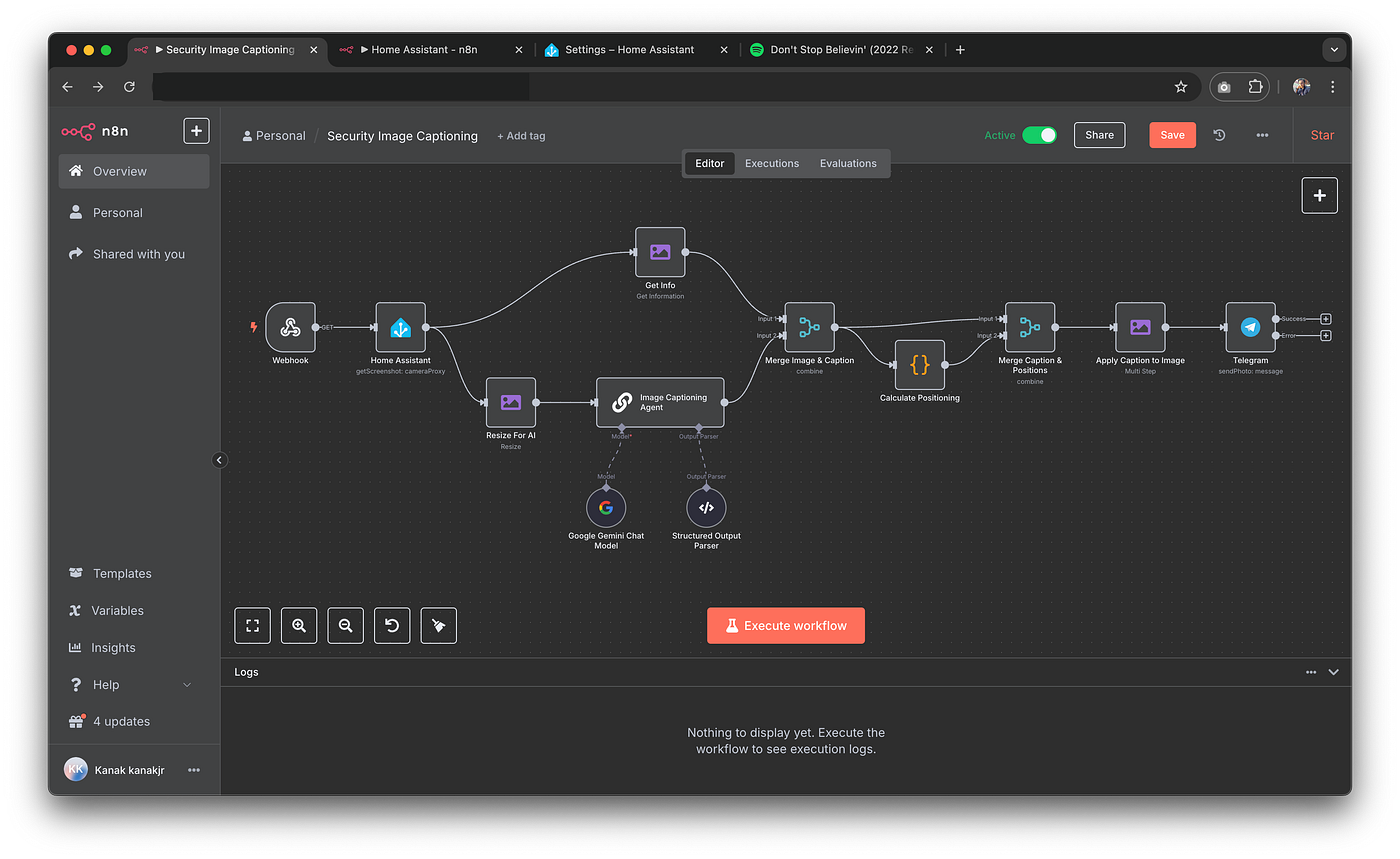
This workflow is a perfect example of how different nodes can work together to create something powerful:
- Webhook Trigger: The workflow starts when it receives the call from Home Assistant.
- Get the Evidence: It immediately fetches the latest image from my
camera.bedroom_camera_hd_stream. - Analyze the Scene: The image is sent to the Gemini multimodal model with a prompt asking it to provide a punny title and a descriptive caption of what's happening.
- Add the Caption: The LLM returns a structured response (e.g.,
{"caption_title": "Unexpected Guest", "caption_text": "A person is standing near the desk."}). n8n then dynamically calculates the correct font size and position and overlays this text directly onto the image. - Send the Alert: The final, captioned image is sent directly to my phone via Telegram. This transforms a generic security event into a rich, informative alert that tells me exactly what I need to know, instantly.
The Building Blocks of an Intelligent Home
This level of automation is made possible by a number of integrations and scripts working in the background. My setup includes devices from various manufacturers all seamlessly connected through Home Assistant:
- Integrations: Mobile App, Plex, Sonarr, Radarr, Tautulli, Spotify, Google Generative AI, and more.
- Devices: My Pixel 9 Pro and Galaxy Watch4 act as presence and activity sensors.
- Scripts: I have detailed scripts for controlling my devices, like switching my camera between a default view and a "privacy" mode where the lens is physically obscured.
What's Next? From a Smart Home to a Conscious Home
The daily digest and smart security alerts are just the beginning. Now that the brain (LLM), nervous system (n8n), and body (Home Assistant sensors) are all connected, we can move from reactive tasks to proactive, adaptive experiences. Here are a few of the ambitious ideas I'm exploring next:
1. The Adaptive Ambiance Engine
Right now, I trigger my "Relax" or "Movie Time" scenes manually. The next evolution is a home that senses my state and adapts the environment for me proactively.
The Concept: Instead of me telling the house I need to relax, the house will figure it out on its own.
The Data: This system will fuse multiple data points:
- Physical Activity: My
sensor.pixel_9_pro_daily_stepsandsensor.galaxy_watch4_exrr_heart_rate. Had a long day with lots of walking and an elevated heart rate? The house knows I'm likely tired. - Time & Environment: The time of day and the
weather.homesensor. A gloomy, rainy evening calls for a different vibe than a bright summer afternoon. - Current State: It will see that all media players are off and my activity is "still."
The AI's Logic: When I arrive home, n8n will send this context to the LLM with a prompt like: "Kanak just got home. He had an active day (12,000 steps) and it's raining outside. Suggest a 'decompression' scene with specific light settings, a calming Spotify playlist, and an air purifier level."
The Outcome: I walk in, and without touching a thing, the lights shift to a warm, dim glow, a lofi-beats playlist quietly starts on my speaker, and the air purifier hums gently. The house hasn't just been automated; it's being empathetic.
2. Proactive "Focus" and "Wind-Down" Modes
My home should be a partner in both my productivity and my well-being. This idea creates automated environments to help me get into deep work and, just as importantly, to disconnect afterward.
The Concept: The house will automatically create a "Focus Mode" during work hours and a "Wind-Down" sequence in the evening.
The Data:
- Time of day and my
sensor.pixel_9_pro_detected_activity. If I'm "still" at my desk for a prolonged period during the workday, it's a strong signal I'm trying to concentrate. - My Calendar integration (a future addition) could see "Focus Time" blocks.
- The
Galaxy Watch4can detect when I've fallen asleep, providing feedback to the system.
The AI's Logic:
- Focus Mode: At 10 AM, if I'm at my desk, the LLM will tell n8n to turn my desk lamp to a cool, bright white, turn off distracting ambient lights, and play a "Deep Focus" playlist.
- Wind-Down Mode: At 10:30 PM, if the lights are still bright and I'm active on my Xbox, the LLM could send a notification: "It's getting late. Ready to start winding down for the night?" If I agree, it would begin a 30-minute sequence -- gradually warming and dimming the lights, shifting the music to something ambient, and ensuring the bedroom is at a comfortable temperature.
The Outcome: The home helps create healthy boundaries between work, leisure, and rest, all automatically.
3. The Dynamic Security Shield
The image captioning is a fantastic reactive measure. The next step is a security system that can assess threat levels and act as an active deterrent.
The Concept: Escalate the security response based on the severity of the situation, as determined by the LLM.
The Data: This will use a chain of events: device_tracker (I'm not home), binary_sensor.room_door_door (the door opens), camera.bedroom_camera (a person is detected inside), and sensor.galaxy_watch4_exrr_activity_state (I'm asleep).
The AI's Logic & Escalation:
- Level 1 (Observation): A person is detected on the porch. Action: Log the event and send me a captioned photo. No alarm needed.
- Level 2 (Warning): A person is detected inside the bedroom at night while my watch shows I'm asleep. Action: Send a critical, high-priority notification to my phone, and flash the bedroom lights once.
- Level 3 (Deterrence): The person from Level 2 does not leave within 60 seconds. The LLM is now prompted: "High-threat event detected. Intruder lingering in the bedroom while the user is asleep. Generate a deterrent sequence." Action: n8n executes the LLM's response -- activating the
siren.smart_hub, flashing all house lights red, and broadcasting a "You are being recorded" message on the speakers.
The Outcome: A security system that is nuanced, using different data points to distinguish between a delivery person and a potential threat, and taking decisive action when necessary.
These are the kinds of ambitious projects that become possible when you combine the comprehensive sensing of Home Assistant, the powerful orchestration of n8n, and the reasoning of AI. The home truly starts to feel alive, working with you and for you in a way that feels less like programming and more like partnership.